WORKING BROWSING CHEAT!
Not Available | Please Check Back!!!

Pages

Sunday, September 8, 2013

How to Root An Android Phone Without a PC

Root android phone without computer Fastest way to Root any Android Phone Without a Computer


Rooting an android phone can be tasking for those users who do not have a computer . Today i am going to show you the Fastest way to Root almost any android phone without a computer .
Framaroot is an application that roots almost any android phone or device without the need of a Computer . Framaroot at the moment supports  Android versions from 2.0 to 4.2 . 
IMPORTANT!  : Rooting your device will VOID your Android phone’s WARRANTY ! . I will not be responsible in any way .

Steps to root you android phone without a computer .

  • Step 1: Download the framaroot app from here to your computer
  • Step 2: Copy Framaroot from your computer to your phone memory
  • Step 3: Install Framaroot from the apk file
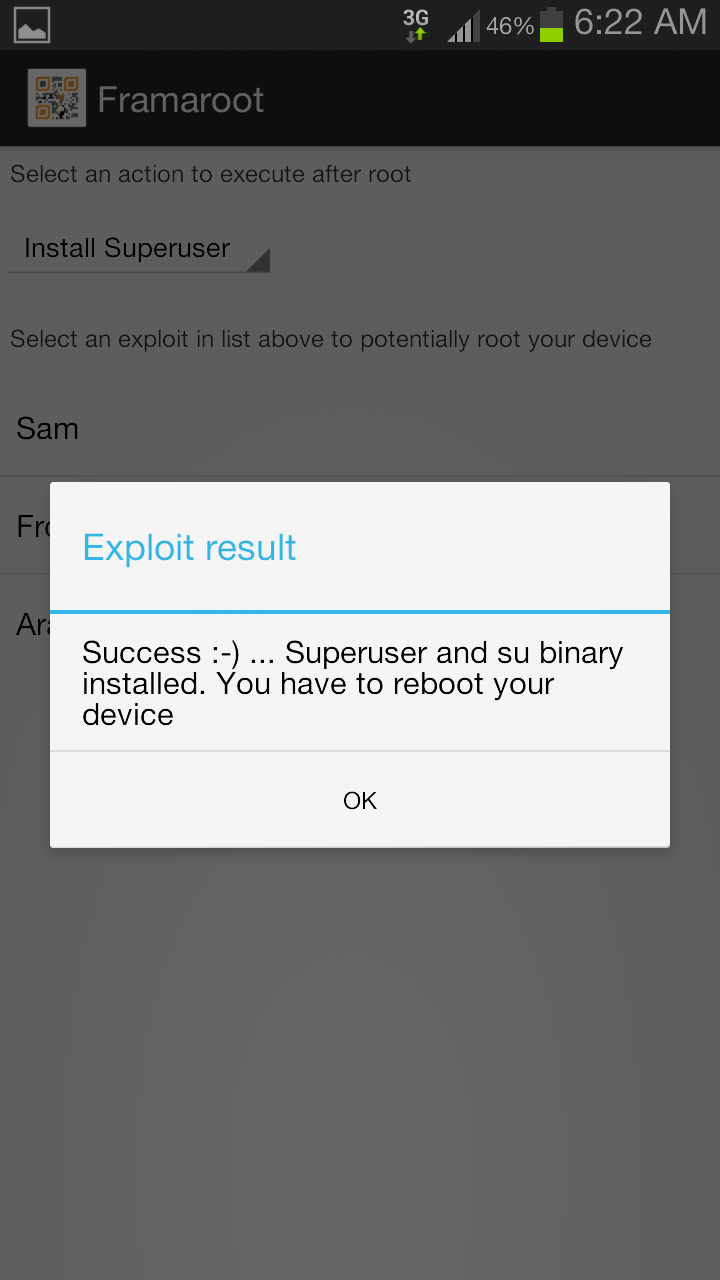
  • Step 4: Choose “install Superuser”  option inside Framaraoot
  • Step 5: Select any of the exploits that appears in the app and wait for some time .
  • Step 6: If you see a “Success  … Superuser and su binary installed. You have to reboot your device” message then you have successfully rooted your phone .
  • Step 7: If you see “Failed … Try another exploit if available”  message then try selecting another exploit .
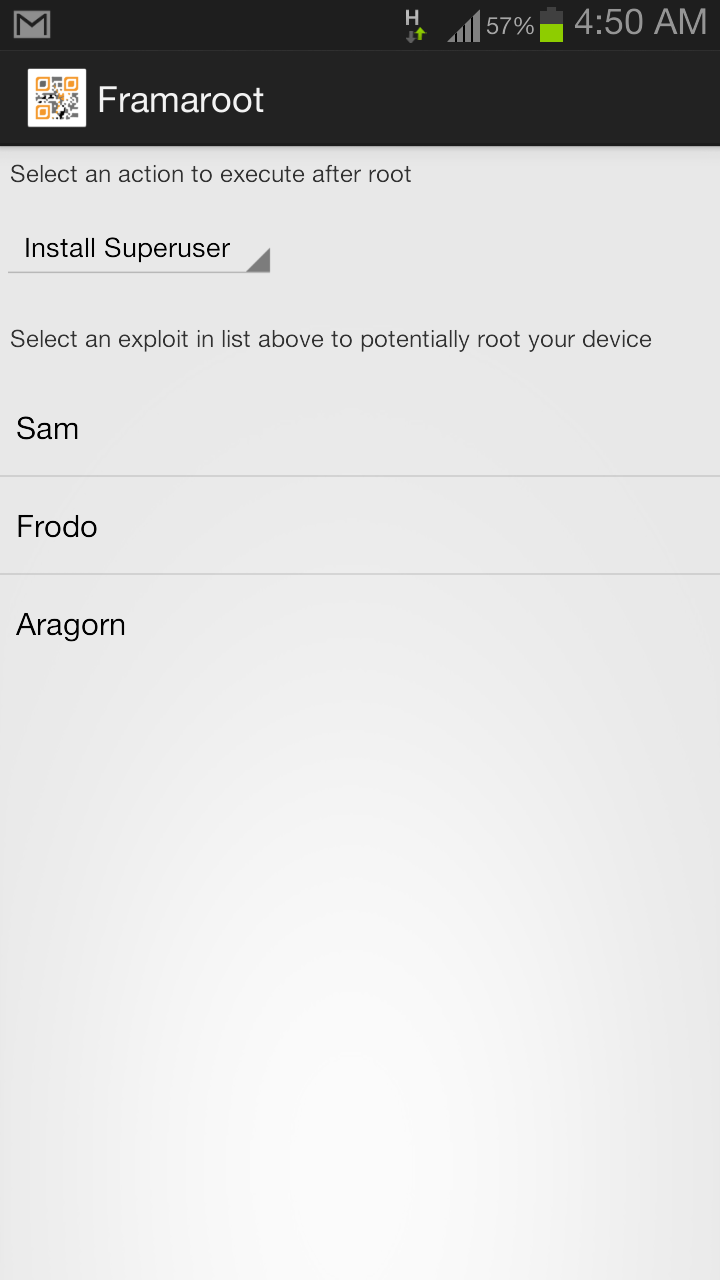
Screenshot 2013 07 28 04 50 12 Fastest way to Root any Android Phone Without a Computer    Screenshot 2013 08 01 06 22 20 Fastest way to Root any Android Phone Without a Computer
Download Root checker to verify if your phone is rooted or not .
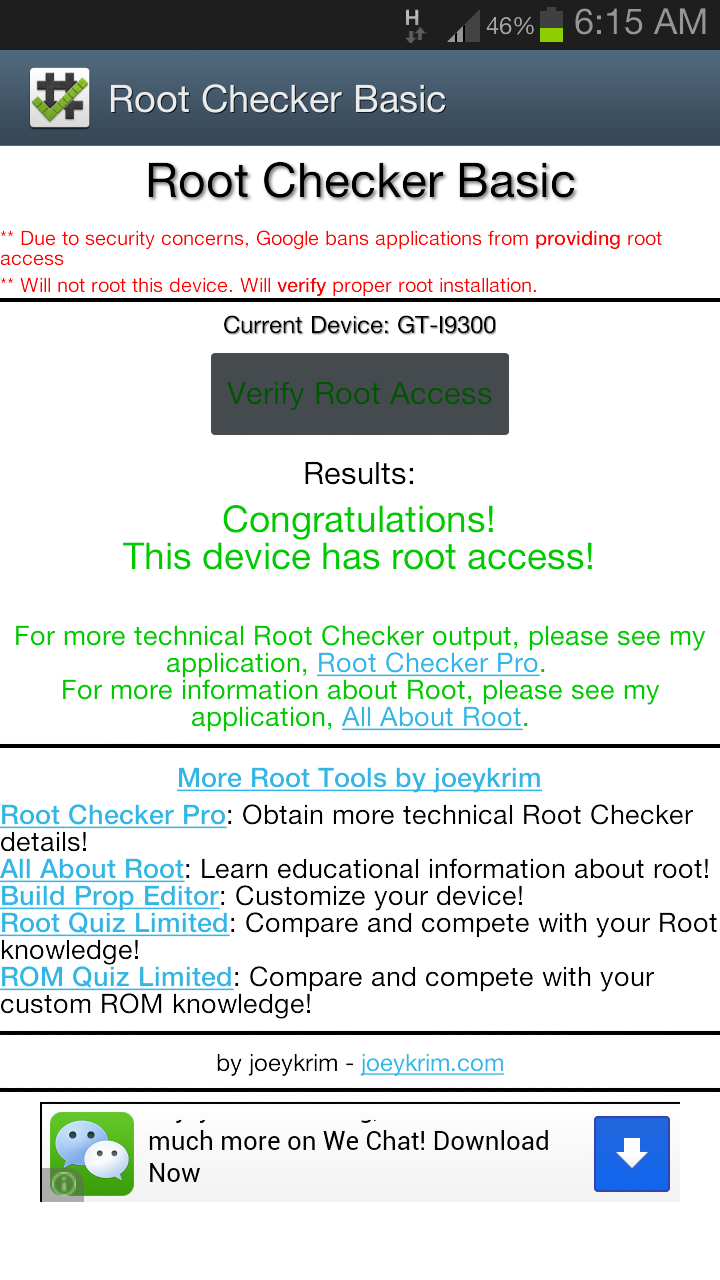
Screenshot 2013 08 01 06 16 00 Fastest way to Root any Android Phone Without a Computer

 List of Confirmed Android phones which can be rooted with this method

Compatibility for Qualcomm devices (Gandalf exploit only) :
  • Asus Padfone 1/2
  • Asus Padfone Infinity
  • Asus Transformer Pad Infinity TF700KL
  • BW T18+ (Fortis Evo)
  • Cloudfone Thrill 430x
  • Disgo 8400g
  • DNS S4504/S4503/S4502
  • FAEA F1
  • Gigabyte GSmart G1315 Skate
  • Gigabyte GSmart Rio R1
  • Google Nexus 4
  • Highscreen Spark/OMEGA Q/Blast/Strike/Boost
  • HTC One S
  • Huawei Honor Pro (U8950-1)
  • Huawei U8815/U8816 Ascend G300/G301
  • Huawei U8825D Ascend G330D
  • Karbonn Titanium S5
  • Kyocera Torque
  • Lenovo S870E
  • LG Nitro HD
  • LG L7 II P710/P714/P715
  • LG Optimus F5 (P875)
  • LG Optimus G E970/E975
  • LG Optimus L3 II E425
  • LG Optimus L5 E610/612/615
  • LG Optimus L7 II P710/P713/ P714/P715
  • LG Optimus L7 P700/Р705
  • LG Optimus LTE 2
  • MEDION LIFE P4013
  • Micromax A111 Canvas Doodle
  • Oppo Find 5
  • Orange Nivo
  • Pantech Discover
  • Pantech IM-A840S Vega S5
  • Samsung Galaxy Win I8552
  • Sharp Aquos Phone SH930W
  • Sony Xperia E C1505/Dual C1605
  • Sony Xperia L C210X
  • teXet TM-3204R
  • teXet TM-4677
  • Xiaomi Mi-2S
  • ZTE V880G/ZTE V955
  • Waiting feedbacks …
Compatibility for MTK devices (Boromir exploit only) :
  • Alcatel OT 4030D S’POP
  • Alcatel OT 8008D Scribe HD
  • Alcatel OT 997D
  • Alcatel OT Idol 6030X/6030D/6030H
  • Amoi N828
  • ASUS Memo Pad HD 7
  • Chinese Star S7589
  • DAXIAN XY100S
  • Explay HD Quad
  • Explay infinity II
  • Explay Polo
  • Explay Surfer 7.32 3G
  • Explay Surfer 8.31 3G
  • Fly IQ440 Energie
  • Fly IQ441 Radiance
  • Fly IQ442 Miracle
  • Fly IQ443 Trend
  • Fly IQ446 Magic
  • Fly IQ450 Quattro Horizon 2
  • Fly IQ451
  • GoClever Fone 570Q
  • Haipai I9389
  • Highscreen Alpha GTX
  • HKC Q79 3G
  • Huawei U8836D G500 Pro
  • IconBIT NetTAB Space 3G Duo
  • iOcean X7
  • Jiayu G2
  • Jiayu G3S
  • Jiayu G4
  • KENEKSI Beta
  • Lava iris 405
  • Lenovo IdeaPhone P700i
  • Lenovo IdeaPhone S720
  • Lenovo IdeaTab A3000-H
  • Lenovo IdeaTab S6000-H
  • Lenovo P770
  • Lenovo S820, S920, A390
  • Micromax Canvas HD
  • Motorola RAZR D3
  • Newman N1
  • Oppo findway U7015
  • OUMEI X5
  • Philips W536
  • Philips W736
  • Prestigio MultiPhone 4055
  • Prestigio MultiPhone PAP 4505DUO
  • Sharp AQUOS SH837W
  • Star S5 Butterfly
  • TeXet NaviPad TM-7055HD
  • Texet TM-5277
  • THL V12
  • THL W100 (130711)
  • THL W200
  • ZOPO C2 Platinum
  • ZOPO ZP 910
  • ZOPO ZP300+
  • ZOPO ZP900 Leader
  • ZTE V880G/H
  • ZTE V987 Grand X Quad
  • Waiting feedbacks …
    Compatibility for Samsung devices (Legolas and Aragorn exploits only) :
  • Samsung Galaxy Core GT-I8262
  • Samsung Galaxy Proclaim S720C
  • Samsung Galaxy Young GT-S6312/GT-S6310
  • Samsung Lightray SCH-R940
  • Waiting feedbacks …
Compatibility for Exynos devices (Sam, Frodo, Legolas and Aragorn exploits only) :
  • AT&T Galaxy Note 2 SGH-I317
  • Highscreen Explosion
  • Hyundai T7s
  • Impression 9702 (Exynos 4412)
  • Lenovo K860/К860i
  • Newman N2
  • Meizu MX2
  • Samsung Galaxy Camera EK-GC100
  • Samsung Galaxy Note 10.1 GT-N8000, GT-N8010, GT-N8013, GT-N8020
  • Samsung Galaxy Note 2 GT-N7100
  • Samsung Galaxy Note 2 LTE GT-N7105
  • Samsung Galaxy Note 8.0
  • Samsung Galaxy Note GT-N7000
  • Samsung Galaxy S GT-i9000
  • Samsung Galaxy S2 AT&T SGH-I777
  • Samsung Galaxy S2 Epic 4G Touch – SPH-D710
  • Samsung Galaxy S2 GT-I9100
  • Samsung Galaxy S3 GT-I9300
  • Samsung Galaxy S3 LTE GT-I9305
  • Samsung Galaxy Tab Plus GT-P6200/GT-P6210
  • Samsung Galaxy Tab 7.7 GT-P6800/GT-P6810
  • Samsung SGH-i997 Infuse 4G
  • T-Mobile Galaxy Note 2 T-889
  • Verizon Galaxy Note 2 SCH-I605
  • iBerry Auxus CoreX2 3G and CoreX4 3G
Compatibility for Omap36XX devices (Gimli exploit only) :
  • Archos Gen8
  • Cliq 2 MB611
  • Coolpad Quattro 4G
  • Droid 2 (a955)
  • Droid 2 Global (a956)
  • Droid X (MB810)
  • LG Marquee LS855
  • LG P970 Optimus Black
  • Motorola DEFY+ (MB525 / MB526)
  • Motorola Droid PRO
  • Motorola Droid X
  • Motorola XPRT
  • Parrot ASTEROID Smart
  • R2D2 (a957)
Source: Techverse

Saturday, September 7, 2013

How to share files between Android and Windows

Hello everyone, hope everybody is in good Health?? Today i would show you all how to share files between Android and windows. Sharing files between an Android device and Windows isn't as difficult or as tedious as it once was. Apps, like ES File Explorer, can even share files over Wi-Fi with relative ease. 

ES File Explorer - Windows folder

There was a time when the only way you could share files between your Android device and a Windows computer was by using a USB cable. These days, there are wireless options available that make it easier to share files. One such option is ES File Explorer, a powerful Android file manager. ES File Explorer helps you manage the files on your local Android device. Starting with version 3, however, LAN support was added to make it possible to share files with a Windows PC over Wi-Fi. To share files between your Android device and a Windows PC using ES File Explorer, follow the steps below:
Step 1: Create a shared folder on your Windows PC. In our example, we'll name it, "Android PC share." Make sure the permissions are set for read/write access.
Step 2: In ES File Explorer on your Android device, tap the globe icon in the upper-left hand corner, then navigate to Network > LAN.
ES File Explorer - enter LAN
Step 3: On the menu at the bottom, tap "Search" to look for available network shares on your LAN. If you don't see any, make sure that your Android device and the Windows computer are connected to the same local network and try again. If successful, you should see your Windows computer listed with its IP address.
ES File Explorer - search LAN
Step 4: Tap on the icon for your Windows PC, then enter your Windows username and password.
ES File Explorer - Windows login
Step 5: After your shared folder appears, you can begin sharing files back and forth using ES File Explorer.
ES File Explorer - share files
As simple as that.

Thursday, September 5, 2013

Multi-Links Browsing with Tunnel Guru VPN


Hello everyone, hope you all are still flexing Tunnel Guru with Glo?? Because its what am using at the moment. Without much words, many of our followers have been requesting for Multi links settings with Tunnel Guru, here it is.
This is for people who have Multi Links modem &  also in a location that Multi links functions very well.


                   Download  TunnelGuru v2.3.0.0 :     For win 32 bit  |     For win 64 bit
NOTE:  You need  java Runtime installed on your pc to be able to run this software, you can download java Runtime from HERE


Server : Select any UDP,ICMP server of your choice from the drop down menu.

Rport : 9200     Lport : 80    Protocol : UDP    UnCheck - Use Local DNS Server

NEW   TUNNEL GURU USERS   

If you are  new to Tunnel Guru please Click here and register for  a free account. But before you can use your free account you need a "Tunnel Guru Voucher" Dont be scared, its just 600naira.  Click here  to get Unlimited Tunnel Guru voucher.

                                                               As simple as ABC
                                                                                  
Like our Facebook page, if you want frequent updates on Free Browsing.
                                                     https://www.facebook.com/Netinfong      

Wednesday, September 4, 2013

Johnny at the supermarket


Johnny enters Supermarket to buy himself orange juice and sugar.
He paid for the orange juice and walked out with the sugar under his arm, unpaid. At the door he was arrested and locked up. During the court hearing, the judge asked him why he paid for the juice only and stole the sugar? He replied"I do not steal. At the back of the juice bottle is said: SUGAR FREE! You think I am stupid or what?

Monday, September 2, 2013

iPhone Emulator for PC Download

iOS is probably the best smartphone platform that offers unbelievable features and functions for iOS devices. iOS has been providing all a different user interface from all the other platforms and this is the obvious reason why people get annoyed with it. Well, you can do everything like all the other devices with proper knowledge. If you are looking for a cross platform for your Windowsbased PC for iOS device, here’s something special for you. It called as iPhone Emulator which is compatible for all iOS devices like iPad, iPod touch too. iPadian, this is the emulator which you should  install on your PC now to use your iDevice well. iPhone Emulator for PC Download from here. Details are as follow! 
iPadian Main
iPadian is there to get you the same environment like you are using an iPhone. It makes you able to feel how iPhone works in a real, through your Windows PC. It’s just easy and fun to use. It doesn’t require anything to make use of it. However, iPhone users too like to have this simulator installed on their PCs. It’s the way of getting the same experience of an iDevice. If you don’t have any iDevice still want to check out or to get hands-on, iPhone Simulator is the only option left. It makes you able to use iPhone from your PC.
I’m sure, you are well aware of Android and its emulators. Android holds a number of different emulatorswhich do the same thing for Android users. Bluestacks is the best Android emulator at the present time. It offers a decent user interface to feel like you are actually using an Android device. Well, this iPhone Simulator does provide the same user interface of an iPhone. And it is the best iPhone simulator that is liked by almost every user of it. It holds a decent UI and hence easy to use. Following are some cool features of iPhone Simulator. Have a look!

Features of iPhone Emulator- iPadian:

  • Simplest and decent user interface
  • Full preview option like you are using an iPad or iPhone
  • Same environment of an iDevice
  • Make use of it with your mouse
  • Light Weight software that runs on your Windows PC well
  • Use it and the rest you will see
iPadian is the most popular iOS Emulator that allows you to let run play iOS games and apps within yourWindows PC. Sound cool. Isn’t it? This emulator carries all kinds of features and functions of a real iDevice. It gives you a new iPad like screen with a side screen option, which makes everything possible for you. You can see a whole new iPad screen there from which you can download and install iPhone and iPad games and apps without any requirements.

iPhone Emulator for PC Download 

iPadian 1
To run and play iPhone games and apps, you just need to click on to the above link and downloadiPadian on your PC. The file will be of .rar file and hence you need to extract the downloaded file first. Open the downloaded file and extract the it. There you can see various option with Adobe player and many other things. The file will be loaded with Adobe player, so make sure to install it before anything. Run the iPadian.exe file and within a moment iPad like screen will be there on your desktop. It would be of full screen mode, you can have a whole screen of your desktop like an iPad screen. It gives you the same graphical interface too. If you really are looking for an iOS emulator, this could be the only choice of yours! Grab it now!
So folks, this was all about the iPhone Emulator that supports all kinds of iOS apps and games including iPhone, iPad and iPod Touch devices. The interesting this about this emulator is its graphical interface. It makes you feel like you are using a real iPad or an iDevice. The same environment and the same UI like a real iDevice. It’s just amazing. Give it a try right away!

How to Find Missing Hard Drive Files

Happy new month to you all. we have been receiving mails from our Fans saying most of the time, they cant just Find their files anymore on their Hard drives, but yet when they check the Hard Disk properties, it shows that their Disk space is still occupied.

The first thing you should do is check if your hard drive files are hidden (not missing), to do this;
Go to your Start Menu and search by typing “Show Hidden Files and Folders” then click on the option.
In the Windows that opens, under “Hidden Files and Folders”, check “Show Hidden Files and Folders” if it’s not checked already then click OK.
If you don’t still see the files on your hard drive, it then means they are not hidden but missing.

Then Do This:-


  • Download and Run Autorun Exterminator to help you remove any Autorun Virus from your Hard drive.
  • Open Command Prompt (CMD);
    • For Windows XP, open Run and type “cmd” (without the quotes)
    • For Windows Vista, 7 and 8, go to the Start Menu and search “cmd”
    • Once Command Prompt opens type this: attrib -h -r -s /s /d g:\*.*
    • Make sure you replace the letter “g” in that command with the drive letter where your hard drive is.


After this has been done wait a little while, unplug your hard drive, and plug it back in, then check for your missing hard drive files and folders. 
Enjoy

Share

Twitter Delicious Facebook Digg Stumbleupon Favorites More